Designing a brochure in a tool your printer cannot work with costs a round of rework before anything is printed. Choose the software by two questions, who will edit the file later and what file the printer needs, and compare design quotes by their components rather than by a single total.
For a brochure that goes to a commercial printer, use the page layout application of whoever will maintain the file; Adobe positions InDesign as a layout tool for print and digital publishing. Affinity (which says it is free for individuals) and the open-source Scribus are lower-cost layout options, and Word’s free brochure templates suit simple in-house pieces. Microsoft is retiring Publisher in October 2026, so it is not a tool to start new work in. Whatever you choose, the printer’s file specification decides whether the file is print-ready. Design quotes differ mostly in scope, copy, images, revision rounds and file handover, so ask for them itemised.
| Input or item | Typical value or source | Why it matters |
|---|---|---|
| Printer’s file specification | Ask the printer: size, bleed, colour mode, file type | Decides whether a tool’s output is usable |
| Format and folds | Your brief: flat size, panels, fold type | Sets the template and page setup |
| Who edits later | You, a colleague or a designer | Decides which source file format you need |
| Software budget model | Subscription, free for individuals, open source or included templates | Ongoing cost of keeping the file editable |
| Copy and images | Ready, to be written, to be shot or licensed | Can change a design quote considerably |
| Revision rounds | Number included in a quote | Extra rounds are often charged separately; check the quote |
This guide is a comparison compiled from public sources, makers’ product pages and, for Scribus, an encyclopedia entry; no tool was tested for it. It gives no prices, because design fees vary with scope and the sources used here do not publish comparable rates.
Quick answer by situation
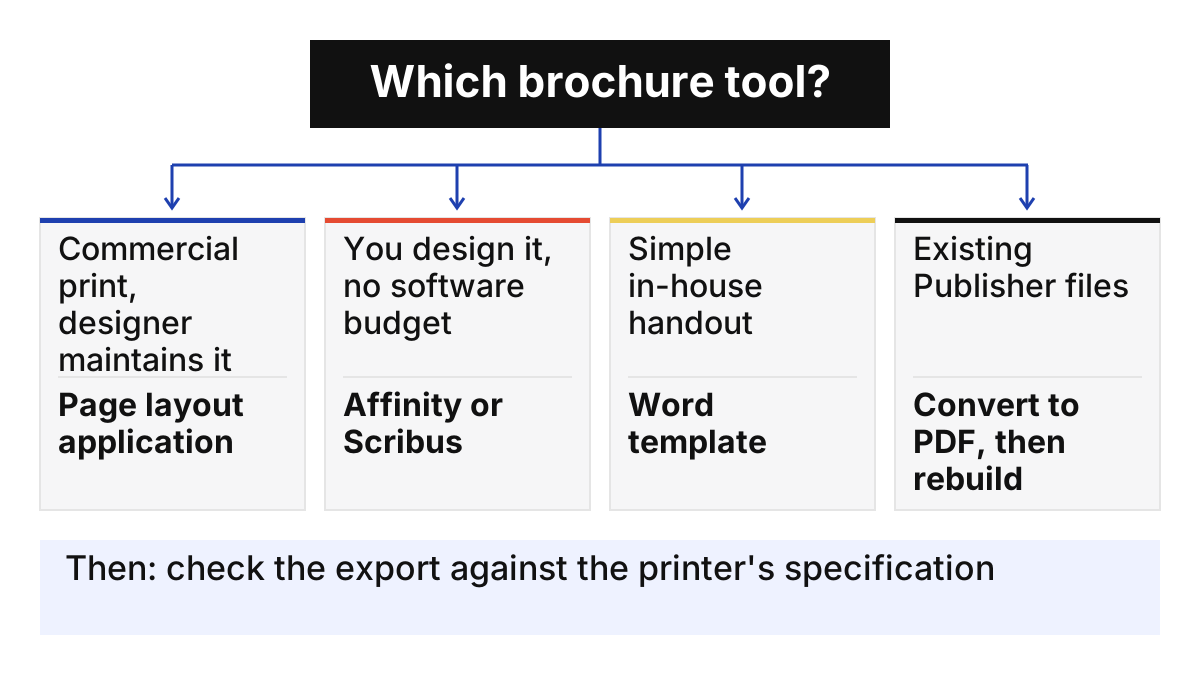
Match the tool to the job: a professionally printed brochure that a designer will maintain belongs in that designer’s page layout application; a low-budget brochure you will maintain yourself can use a free layout tool; a simple internal handout can start from a Word template. If you have Publisher files, export them while you can still open them.
| Your situation | Start with | Why |
|---|---|---|
| Designer-made brochure for commercial print, updated over years | The designer’s page layout application (for example InDesign) | Adobe describes InDesign as built for print layout and PDF output; the file stays editable by the person who maintains it |
| You design it yourself, no software budget | Affinity (free for individuals) or Scribus (open source) | Layout tools without a subscription |
| Simple in-house brochure, office printer or quick copy shop | Word brochure template | Free templates; familiar editor |
| Existing Publisher brochures | Convert to PDF, then rebuild in another tool | Microsoft is ending Publisher in October 2026 |
| Online editor already used by your team | Check its print PDF export against the printer’s specification | Print features vary by tool and plan |
Takeaway: Decide who will edit the brochure next year before you decide which software makes it this year.
What makes brochure software print-ready?
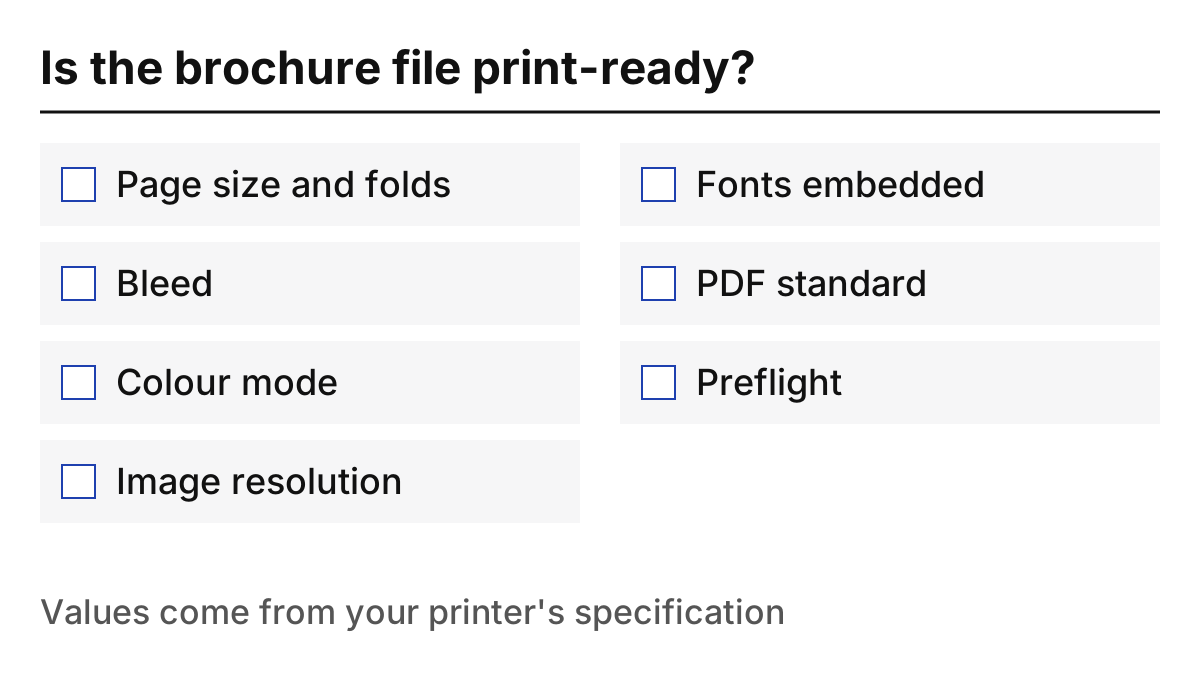
A tool is print-ready for your job when it can produce exactly the file your printer asks for: correct trim size and folds, bleed, the requested colour mode and resolution, and a PDF in the requested standard. The table lists what to check; your printer’s specification sheet supplies the values.
| Check | What to look for in the tool | Where the requirement comes from |
|---|---|---|
| Page size and folds | Custom page size, multi-panel spreads, fold guides | Your brief and printer’s templates |
| Bleed | A bleed setting that extends artwork past the trim | Printer’s specification |
| Colour mode | Export in the colour mode the printer requests | Printer’s specification |
| Images | Placed images at the resolution the printer asks for | Printer’s specification |
| Fonts | Fonts embedded or outlined in the PDF | Printer’s specification |
| PDF standard | Export to the PDF standard requested (for example a PDF/X variant) | Printer’s specification |
| Preflight | A way to check the file before export | Your own quality check |
Common mistake: Choosing software first and asking the printer later. Get the printer’s file specification before design starts, so the template is set up correctly from page one.
The same file discipline applies to other print work: our guide to print advertising examples ends with a self-check that includes print-ready files, and packaging artwork follows the converter’s own file guide, as the coffee pouch quote questions show.
Takeaway: Treat the printer’s specification sheet as the brief for the software choice.
Brochure software compared
The tools differ less in whether they can make a brochure than in price model, who they are built for and how much of the print specification you can control. The table uses each maker’s own description; items not found in the sources read are marked to be confirmed.
| Tool | Type | Price model | Print-related capability in the sources | Watch out for |
|---|---|---|---|---|
| Adobe InDesign | Professional page layout | Subscription, annual plan billed monthly; 7-day free trial | Adobe: page layout “for print and digital publishing”, preflight, native PDF output; used for brochures | Ongoing subscription to keep editing |
| Affinity | Design, photo editing and layout in one app | Free for individuals, per Affinity | Layout included; print export details to be confirmed | Check the export against your printer’s spec |
| Scribus | Open-source desktop publishing | Free, GNU GPL licence | CMYK colours and ICC colour management (Wikipedia); PDF/X export to be confirmed on your version | Interface and support differ from commercial tools |
| Microsoft Word templates | Word processor with brochure templates | Free templates; Word itself per your Microsoft plan | Brochure templates for Word for the web | Ask the printer whether a Word-made PDF meets its spec |
| Online design editors (for example Canva) | Browser-based design | Free and paid plans | To be confirmed: check print PDF, colour mode and bleed options on your plan | Features vary by plan |
| Microsoft Publisher | Desktop publishing (being retired) | Microsoft 365 access ends on or shortly after October 1, 2026; perpetual-version support ends October 13, 2026 | Not for new work | Convert existing files |
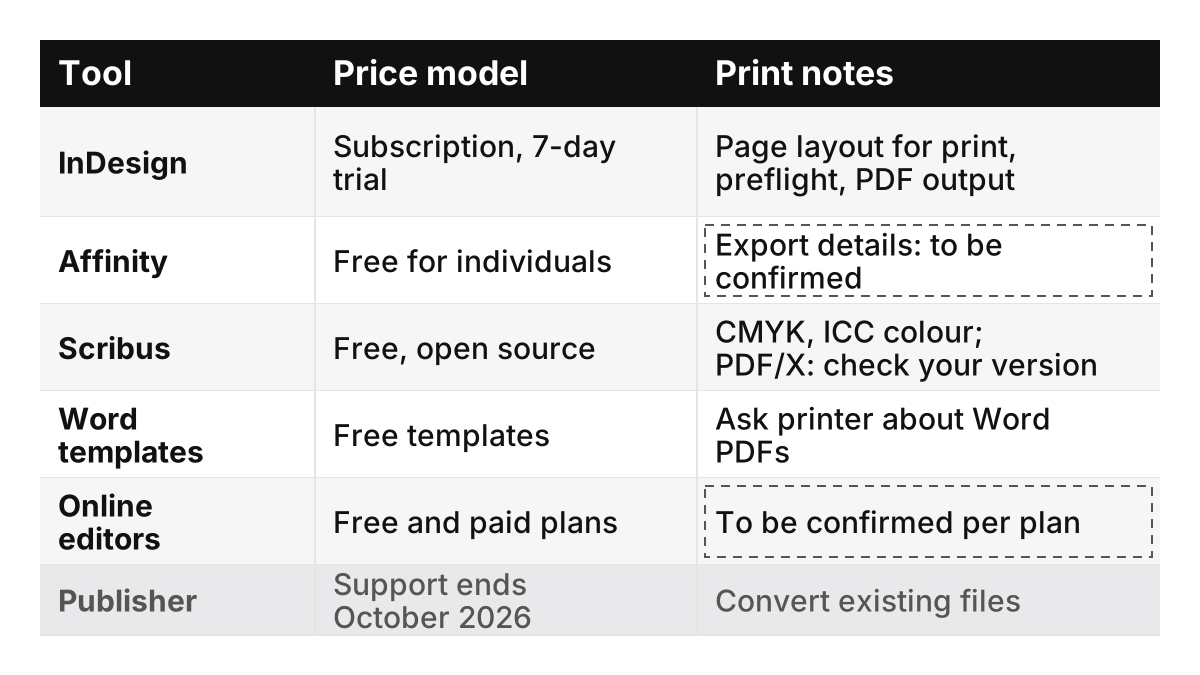
Scribus details come from an encyclopedia entry because the project’s own site could not be read for this guide; confirm features on the version you install. If a brochure carries special finishes such as metallic areas, the separations have to be prepared with the printer; our explainer on in-line metallic coatings lists the questions to ask before sampling one.
Whichever tool you pick, check the handover before you commit: which editable source file you will receive, whether the next editor has that software and licence, how linked fonts and images are delivered, and whether a small change can be made and re-exported without the original designer. Where a tool’s file compatibility is not documented in its maker’s pages, treat it as to be confirmed.
Takeaway: Shortlist two tools from the table, then export a test file from each and send it to your printer for a check.
What happened to Microsoft Publisher?
Microsoft is retiring Publisher in October 2026: Microsoft 365 subscribers lose access on or shortly after October 1, 2026, and support for the perpetual version (Office LTSC 2021 and Office 2021) ends on October 13, 2026, according to Microsoft. Brochures kept as .pub files need converting.
| Date | What Microsoft says happens | What to do |
|---|---|---|
| Until October 1, 2026 | Publisher works as before for Microsoft 365 subscribers | Convert .pub files while you can still open them |
| On or shortly after October 1, 2026 | Microsoft 365 subscribers can no longer access Publisher | If you still have a perpetual installation, export remaining files to PDF; otherwise work from the PDFs you have |
| October 13, 2026 | Support ends for the perpetual version (Office LTSC 2021 and Office 2021) | Stop relying on unsupported installations |
Microsoft recommends saving Publisher files as PDF, and converting a PDF into Word where you need to edit, and says Word and PowerPoint cover many common Publisher scenarios. For a brochure that goes to a commercial printer, rebuilding in a layout tool from the table above gives more control over the print file.
Takeaway: Export every .pub brochure you can still open to PDF, then decide which ones are worth rebuilding.
What a brochure design quote is made of
A design quote is the sum of a few components, and two quotes are comparable only when they include the same ones. The list below is this guide’s checklist for comparing quotes, not a market survey; ask designers to itemise these components, and write the right-hand column into your request so the answers line up.
| Component | Why it changes the price | Write into your request |
|---|---|---|
| Format and panels | More panels and custom folds mean more layout work | Flat size, number of panels or pages, fold type |
| Copywriting | Writing from scratch takes longer than placing supplied text | Who supplies final copy |
| Images | New photography or illustration, or licensed stock, adds cost | Images you supply, need shot, or need licensed |
| Brand assets | Working from an existing brand guide is faster than creating one | Logo files, colours, fonts, existing guide |
| Revision rounds | Each round of changes takes time | Number of rounds included, and the charge for extra rounds |
| Print-file preparation | Setting up bleed, colour and the printer’s PDF standard | Printer’s specification attached |
| Source files and rights | Handing over editable files and usage rights may be priced separately | Whether you receive the editable source file and in which software |
| Printing | Often quoted by the printer rather than the designer; confirm whether it is included | Quantity, paper, finish, delivery, as a separate line or quote |
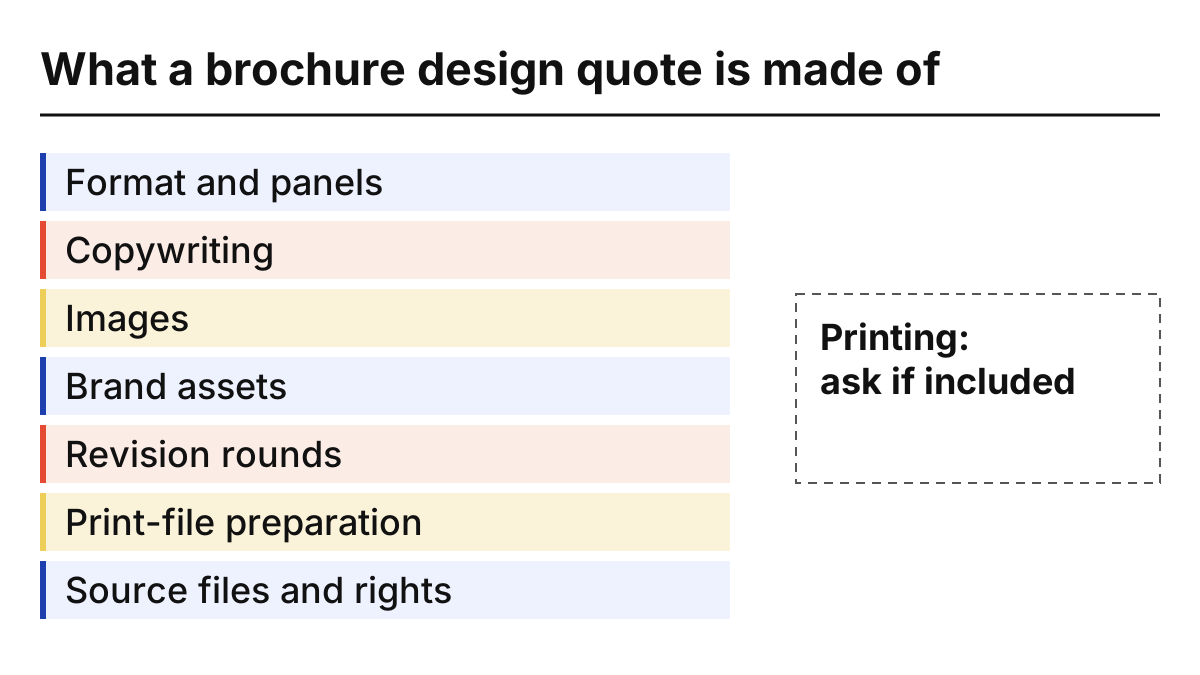
Common mistake: Comparing two totals when one quote includes copywriting and source files and the other does not. Line the quotes up component by component first.
If the brochure covers a regulated product, budget time for a compliance review of images and claims; our explainer on California’s AB 2249 cannabis rules shows what such a review looks like for promotional materials. Brochures that sit beside packaging often reuse label content; see the product label design guide.
Takeaway: Send every designer the same request with the components above, and compare the answers row by row.
A decision checklist
Answer these seven questions in order; together they point to a tool and give you a quote request. If you cannot answer one, that is the first thing to settle.
| # | Question | If the answer is… | Then |
|---|---|---|---|
| 1 | Who prints it? | Commercial printer | Get its file specification now |
| 2 | Who edits it next year? | A designer | Use the designer’s layout application |
| 3 | Who edits it next year? | You, without software budget | Try Affinity or Scribus and test an export |
| 4 | How complex is the layout? | Simple, mostly text | A Word template can be enough |
| 5 | Do you have old Publisher files? | Yes | Convert to PDF before rebuilding |
| 6 | Is the copy ready? | No | Add copywriting to the quote request |
| 7 | Do you need the source file? | Yes | Ask for it, and its format, in the quote |
Paper choice changes how colours and finishes look on press; our note on proofing a new label paper shows why approving on the actual stock matters, and the same applies to brochure papers.
Takeaway: Settle the printer’s specification and the future editor first; the tool choice usually follows.
When this does not apply
This guide covers choosing software and comparing design quotes for printed brochures. It does not give design or printing prices, rank tools on quality or cover web-only brochures and interactive PDFs. Tool information was read on October 7, 2026; online editors’ print features were not checked for this guide. Plans and features change, so check the current product pages before buying.
More on layout, colour and paper is in Print Design, brand-system topics in Brand Graphics, and About explains how this independent site works.
Takeaway: Use this guide to frame the choice; use the printer’s specification and itemised quotes to make it.
Related reading
- Print advertising examples by use case — Check a single-page ad with the five-part breakdown.
- Product label design guide — Plan label content that brochures often repeat.
- Metallic effects without foil — Prepare questions before adding a special finish.