Mixing finished business card sizes with the full-bleed document can cost a reprint through white edges or clipped contact details. Set the US or European finished size at the cut line, extend backgrounds into the printer’s bleed, and keep essential content inside its separate safe area.
US finished size and bleed
FirstPress specifies a finished business card of 3.5 by 2 inches, with 0.125 inch bleed outside the trim and a 0.125 inch safe margin inside it. Its business-card sheet explains the separate risks: cutting movement can clip artwork near the edge, while missing bleed can expose a gap between the printed background and the cut.
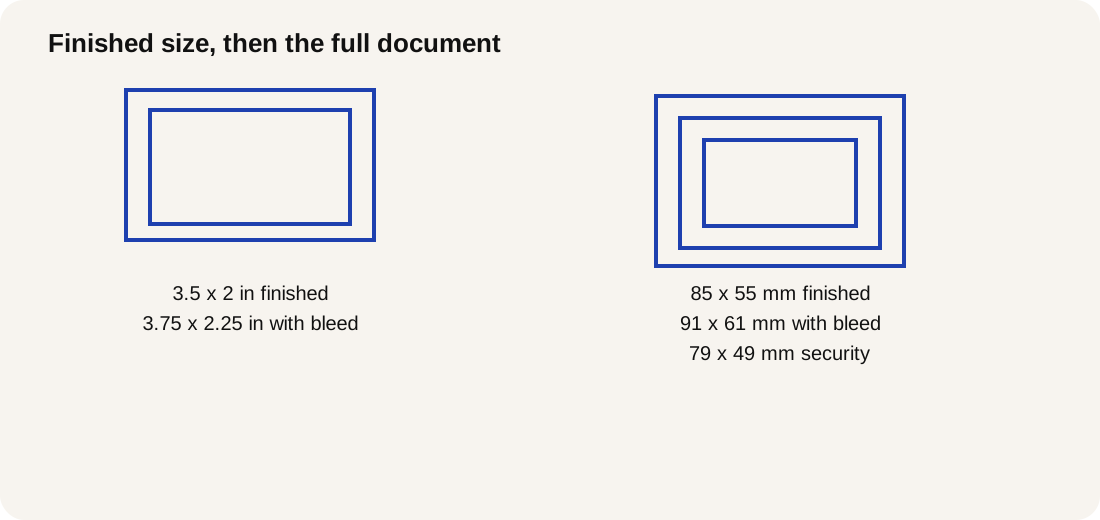
Missouri Document Solutions prints the distinction explicitly: 3.5X2 inches finished and 3.75X2.25 inches including bleed, with an extra .125 inches from all edges. Use those dimensions as the finished and full-document rectangles for that Missouri template. Its safety wording is general, so use the job’s confirmed safety guide rather than calculating a Missouri safe rectangle.
The comparison keeps each published sheet’s requirements together. A margin from another supplier can describe a different setup.
| Source/template | Finished size | Bleed specification | Dominant Failure Mode | Prevention |
|---|---|---|---|---|
| FirstPress | 3.5 by 2 inches | 0.125 inch outward | Essential artwork clipped near the cut | Keep essential content inside its 0.125 inch safe margin; extend backgrounds through bleed |
| Missouri Document Solutions | 3.5X2 inches | .125 inches from all edges; 3.75X2.25 inches including bleed | White edge where a background stops at trim | Carry the background through the full document; retain the finished cut boundary |
| Pressing | 85 x 55 mm | 3 mm outward; 91 x 61 mm including bleed | Contact details lost at the cut | Keep essential content within its 79 x 49 mm security rectangle, 3 mm inward |
European finished size, bleed, and security zone
Pressing’s European business-card template specifies 85 x 55 mm finished, 91 x 61 mm including bleed, and a 3 mm security zone enclosing an inner 79 x 49 mm rectangle. This is the format on that printer’s template; confirm that it matches the product you order.
The sheet asks backgrounds and images to extend 3 mm beyond the cut to prevent white areas. Essential content belongs at least 3 mm inside the cutting lines. Bleed carries disposable artwork outward; the security zone reserves protected space inward. Adding bleed cannot rescue a phone number placed too close to trim.
Rule of thumb: On the Pressing setup, if essential text or a logo sits less than 3 mm inside the cut line, move it inward before export. That threshold comes from Pressing’s security zone and addresses content lost during cutting; it is not a guarantee of cutter accuracy.
Worked geometry: the Pressing rectangles
Add bleed outside the finished rectangle and subtract safety space inside it. The following geometry reproduces the inputs and resulting rectangles printed on the Pressing sheet:
- Full document width = finished width + left bleed + right bleed: 85 + 3 + 3 = 91 mm.
- Full document height = finished height + top bleed + bottom bleed: 55 + 3 + 3 = 61 mm.
- Safe content width = finished width − left security zone − right security zone: 85 − 3 − 3 = 79 mm.
- Safe content height = finished height − top security zone − bottom security zone: 55 − 3 − 3 = 49 mm.
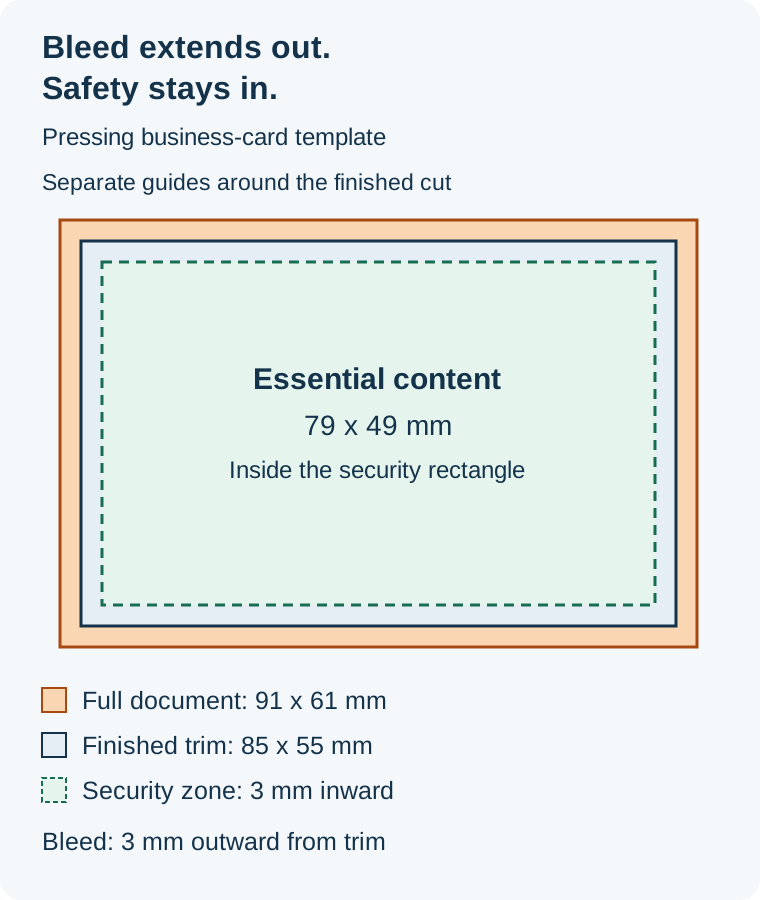
The diagram follows Pressing’s dimensions. The outer band carries the background past trim; the inner dashed boundary limits essential content. The space between those guides does not change the finished card size.
Once the physical rectangles are confirmed, use the business-card pixel canvas guide for the pixel step.
Failure modes and prevention
Prevent white edges by extending the background through the specified bleed. Prevent clipped text by moving essential content inside the specified safety boundary. FirstPress describes these as separate consequences of cutting movement, so check each boundary independently.
Before handing off the file:
- Compare the finished cut boundary with the ordered product. Missouri’s full document includes material that will be removed; it does not describe a larger finished card.
- Inspect the background at every edge. An empty bleed region does not extend the printed image.
- Inspect names, contact details, and logos against the inward safety guide. Keep the margin tied to the sheet for this job.
- Hide or delete the template layer before saving the final PDF, as Pressing instructs. Check the exported copy for visible guide artwork.
Sources
- FirstPress: Custom Business Card Printing — finished product size, safe margin, bleed, and cutting-related failure explanations.
- Missouri Document Solutions: Business Card Template — finished size, full document size, and bleed from every edge.
- Pressing: Business Card Template — final size, full-bleed size, security zone, and template-layer removal.
The dimensions and worked geometry follow these published printer sheets. More file preparation notes are in the print-design article index.